Styling a React application can be a tricky task.
With so many options available, it’s easy to feel overwhelmed.
Choosing the appropriate styling method enhances your development experience, improves the application’s performance, and makes your code easier to manage and scale.
It’s important to get it right from the beginning.
In this article, I’ll share my experience with different styling methods in React.
I’ll discuss their pros and cons and share my preferred approach and advice.
Different CSS Styling Strategies
Vanilla CSS
This is the traditional way of styling websites.
You write plain CSS files and link them to your React components.
Example of Vanilla CSS
// styles.css
.button {
  background-color: blue;
  color: white;
  padding: 10px;
}

// Button.js
import React from 'react';
import './styles.css';

function Button() {
  return (
    <button className="button">
      Follow The T-Shaped Dev
    </button>
  );
}

export default Button;
Pros and Cons of Vanilla CSS
Pros:
- Simple and familiar to most of the developers
- No additional setup
Cons:
- Global scope issues. All styles are global by default which can lead to class name collisions.
- Lack of style encapsulation which can lead to hard times managing the project and its styles
- Limited support for dynamic styling based on component props
- You should come up with many class names
- Separate files for styles and components, context switching, no Locality of Behavior (LoB)
CSS Preprocessors and CSS Postprocessors
CSS Preprocessors: tools like SASS/SCSS, LESS, and Stylus. They let you write CSS with advanced features like variables, nesting, loops, etc. They then compile down to regular CSS.
CSS Postprocessors: PostCSS with plugins like Autoprefixer and Tailwind CSS. It adds features after you’ve written your CSS. They can handle things like adding vendor prefixes automatically.
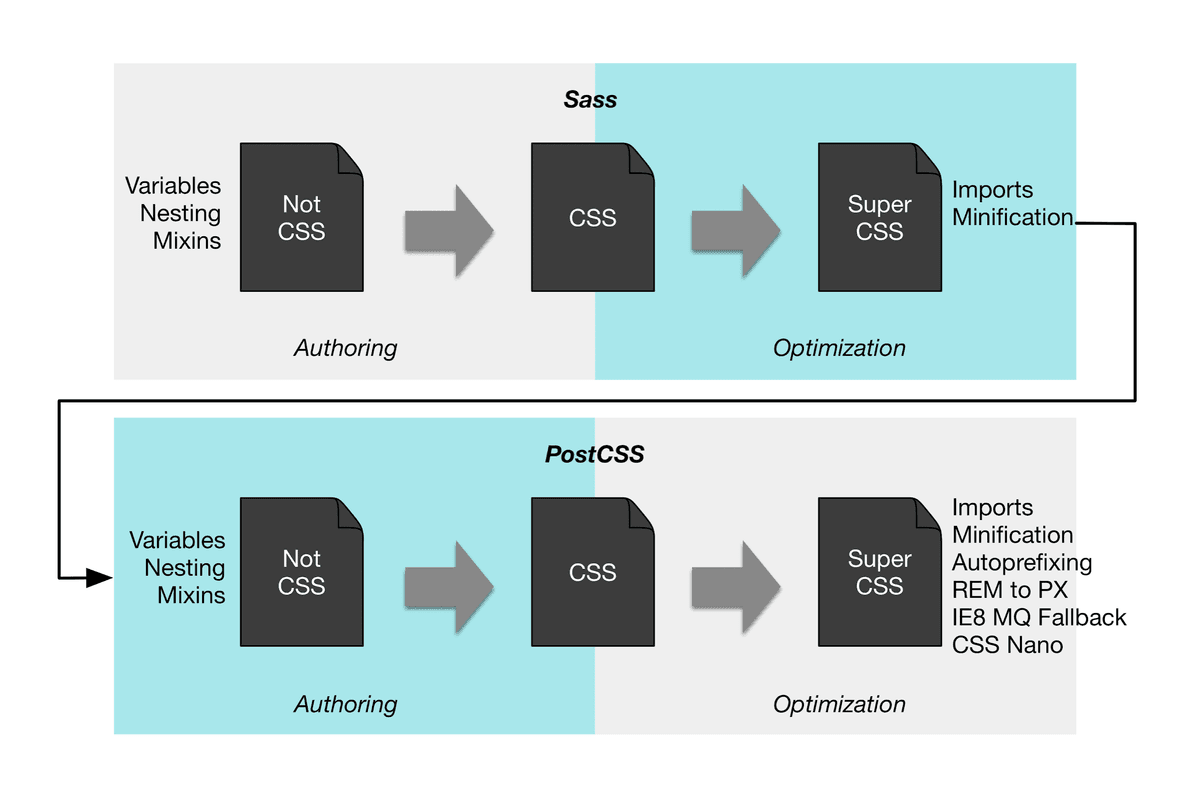 CSS Preprocessors (SASS) and CSS Postprocessors (PostCSS)
Example of CSS Preprocessors (SASS/SCSS)
// styles.scss
$primary-color: blue;

.button {
  background-color: $primary-color;
  color: white;
  padding: 10px;

  &:hover {
    background-color: darken($primary-color, 10%);
  }
}

// Button.js
import React from 'react';
import './styles.scss';

function Button() {
  return (
    <button className="button">
      Follow The T-Shaped Dev
    </button>
  );
}

export default Button;
Pros and Cons of CSS Preprocessors (SASS/SCSS)
Pros:
- Offers advanced features like variables, nesting, loops, etc.
- You can use different styling practices to make your styles more modular and improve the overall code organization
Cons:
- Adds complexity to the setup which requires additional steps and tooling
- Styles are still globally scoped ⇒ class name collisions
- You should come up with many class names
- Separate files for styles and components, context switching, no Locality of Behavior (LoB)
Example of Tailwind CSS
import React from 'react';

function Button() {
  return (
    <button className="bg-blue-500 text-white p-2 hover:bg-blue-700">
      Follow The T-Shaped Dev
    </button>
  );
}

export default Button;
Pros and Cons of Tailwind CSS
Pros:
- Gives you many single-purpose classes and functions where each does only one thing
- Highly customizable
- No custom CSS
- Ensures design consistency because of the standardized system
- No need to come up with class names
Cons:
- Components might become cluttered with many class names
- Some learning curve
- Requires additional setup and configuration, especially for the theming and other customizations
CSS Modules
CSS Modules lets you write CSS files where class names are scoped locally by default. This avoids class name conflicts and keeps styles modular.
You can also combine CSS Preprocessors (SASS/SCSS) with CSS Modules.
Example of CSS Modules
// Button.module.css
.button {
  background-color: blue;
  color: white;
  padding: 10px;
}

// Button.js
import React from 'react';
import styles from './Button.module.css';

function Button() {
  return (
    <button className={styles.button}>
      Follow The T-Shaped Dev
    </button>
  );
}

export default Button;
Pros and Cons of CSS Modules
Pros:
- Styles are locally scoped to components ⇒ no global scope issues and class collisions
- You can use Vanilla CSS or CSS Preprocessors (SASS/SCSS)
- Enhances maintainability by modularized styles
Cons:
-
You should come up with many class names
-
Separate files for styles and components, context switching, no Locality of Behavior (LoB)
CSS-in-JS Libraries
Libraries like styled-components, emotion, vanilla-extract, and linaria let you write CSS directly in your JavaScript files. This way you can style components using JavaScript syntax. Styles are scoped to individual components which avoids class name conflicts.
Note 1: styled-components and emotion are runtime CSS-in-JS libraries. vanilla-extract and linaria are compile time CSS-in-JS libraries.
Example of CSS-in-JS
import React from 'react';
import styled from 'styled-components';

const ButtonStyled = styled.button`
  background-color: blue;
  color: white;
  padding: 10px;

  &:hover {
    background-color: brown;
  }
`;

function Button() {
  return (
    <ButtonStyled>
      Follow The T-Shaped Dev
    </ButtonStyled>
  );
}

export default Button;
Pros and Cons of CSS-in-JS
Pros:
- Encapsulated styles within components ⇒ no global scope issues and class collisions
- Enables dynamic styling using JavaScript and component props
- No context switching between files. Styles are closed to their usage. (LoB principle)
- No need to come up with class names
Cons:
- Adds additional dependencies which might increase the bundle size
- Some learning curve
- Might impact the application’s performance
- There’re could be problems with server-side rendering
Why I don’t like traditional CSS classes
- Naming overhead. Coming up with meaningful class names is not easy. Also, these class names might never be reused so it reduces their significance.
- Context switching. Having to switch between JS and CSS files disrupts the development flow.
- It’s hard to find the appropriate classes and their usage across the components.
My preferred approach and advice
I prefer using classless styling tools like Tailwind CSS 🔥 or CSS-in-JS.
Here’s why:
- Styles live within the components which makes them easier to maintain, manage and extend. Great DX.
- I can read the file from top to bottom and understand what’s going on inside the component.
- No need to invent class names or manage separate CSS files.
- No context switching between files and searching for the classes and their usages.
If our styled components become too large, we can extract them into separate files. This way, we keep our codebase clean without sacrificing the benefits of localized styles.
We can also use Tailwind CSS + CSS-in-JS with the help of twin.macro.
For example:
import React from 'react';
import tw from 'twin.macro';

const ButtonStyled = tw.button`
  bg-blue-500 text-white p-2 hover:bg-blue-700
`;

function Button() {
  return (
    <ButtonStyled>
      Follow The T-Shaped Dev
    </ButtonStyled>
  );
}
export default Button;
⭐ Recap
- Styling in React can be tricky due to the many options available - Vanilla CSS, CSS Preprocessors (SASS/SCSS), Tailwind CSS, CSS Modules, CSS-in-JS.
- Knowing the pros and cons of each approach is crucial for choosing the most appropriate styling strategy for your project.
- There’s no right or wrong approach when it comes to styling in React - Vanilla CSS, CSS Preprocessors (SASS/SCSS), Tailwind CSS, CSS Modules, CSS-in-JS.
- I prefer the classless styling tools like Tailwind CSS 🔥 or CSS-in-JS because this approach doesn’t require inventing class names and keeps styles and components together.
- Keeping styles close to components enhances readability and ease of maintenance.