Your project structure shouldn’t scream “Express” or “Fastify”. It should scream what the app does.
We explored this principle in Screaming Architecture & Colocation.
Vertical Slice Architecture takes it to its logical conclusion: each use case gets its own folder containing everything: handler, validation, types, tests. There is no jumping between 5 directories to understand one operation.
The Problem with Layered Structure
You’ve seen this layout a thousand times:
src/
├── controllers/
│   ├── orderController.ts
│   ├── userController.ts
│   └── productController.ts
├── services/
│   ├── orderService.ts
│   ├── userService.ts
│   └── productService.ts
├── models/
│   ├── order.ts
│   ├── user.ts
│   └── product.ts
├── validators/
│   ├── orderValidator.ts
│   └── userValidator.ts
└── tests/
    ├── orderController.test.ts
    └── orderService.test.ts
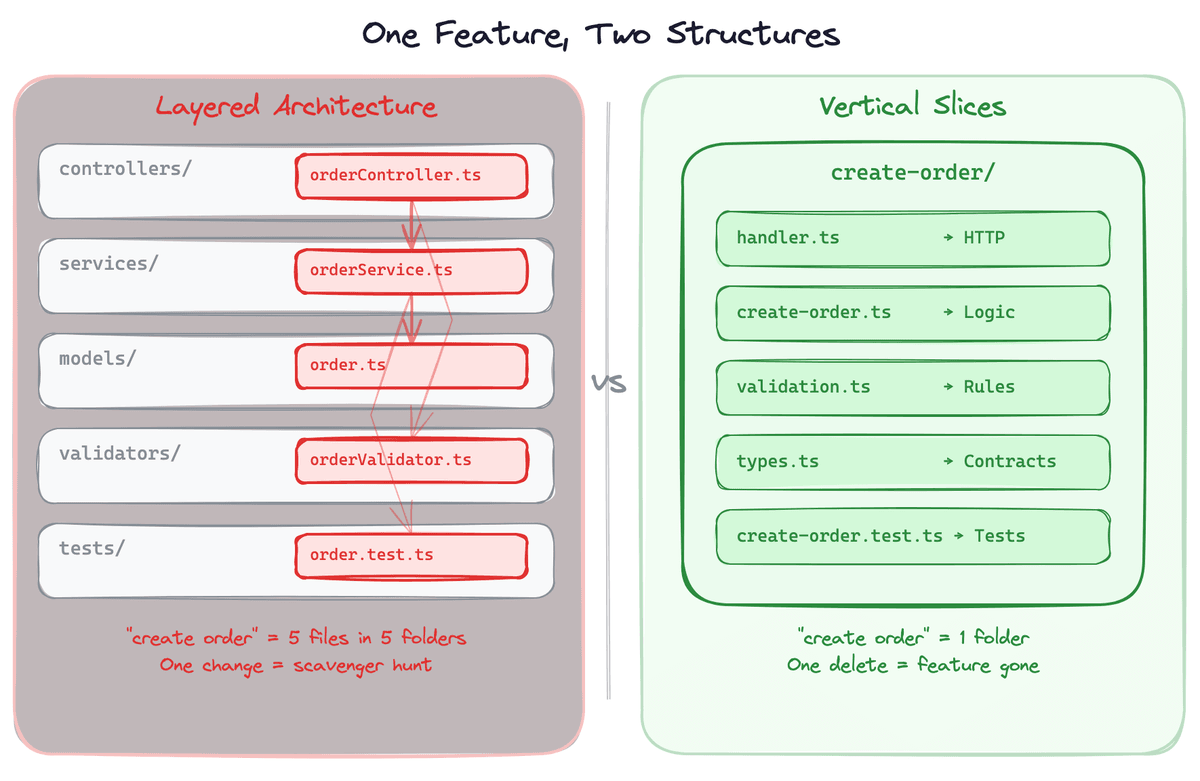
Want to understand how “create order” works? Open 5 folders.
Want to add a new feature? Touch 5 directories.
Want to delete a feature? Good luck finding all the pieces.
The layered structure is organized by technical concern. It answers “where are all my controllers?” but not “where is the order creation feature?”.
Low cohesion. High cognitive overhead. Every change is a scavenger hunt.
What Is Vertical Slice Architecture?
Vertical Slice Architecture, popularized by Jimmy Bogard, flips the axis of organization.
Instead of grouping by layer, you group byuse case.
If you read the screaming architecture post, you might be thinking: “Didn’t we already do this?”. Well, not quite.
Screaming architecture organized by domain module — patients/, orders/, but it still used layers within each module (controller, service, repository).
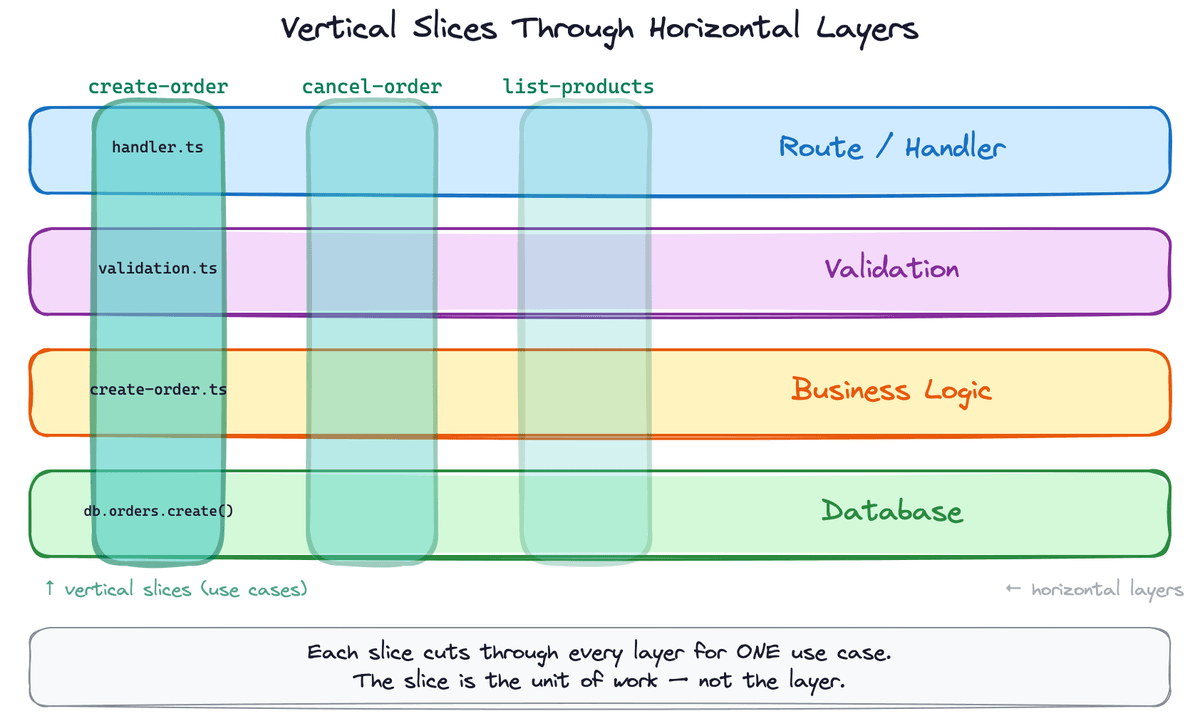
Vertical slices go further. Each folder is a single use case, not a domain module. create-order and cancel-order are separate slices, not methods on an OrderService.
Core principle:
maximize cohesionwithina slice, minimize couplingbetweenslices.
Each slice is one operation, fully self-contained. Adding a new feature means adding a new folder, not modifying shared structures across the codebase.
Here’s the same app, restructured:
src/
├── features/
│   ├── create-order/
│   │   ├── handler.ts
│   │   ├── create-order.ts
│   │   ├── validation.ts
│   │   ├── types.ts
│   │   └── create-order.test.ts
│   ├── cancel-order/
│   │   ├── handler.ts
│   │   ├── cancel-order.ts
│   │   ├── validation.ts
│   │   ├── types.ts
│   │   └── cancel-order.test.ts
│   ├── get-user-profile/
│   │   ├── handler.ts
│   │   ├── types.ts
│   │   └── get-user-profile.test.ts
│   └── list-products/
│       ├── handler.ts
│       ├── types.ts
│       └── list-products.test.ts
└── shared/
    ├── db.ts
    ├── auth.ts
    └── errors.ts
Everything you need to understand “create order” is in one place. Everything you need to delete is in one folder.
Anatomy of a Slice
Let’s build a real slice. Here’s “create order” in Express with Zod validation.
A slice typically has two layers: the handler (HTTP concerns) and the use case (business logic). They live in the same folder — not in separate controllers/ and services/ directories across the project. The types.ts and validation.ts files are standard Zod schemas and TypeScript interfaces — nothing surprising. The interesting part is the split between use case and handler.
features/create-order/create-order.ts — the use case. Pure business logic, no Express types.
import { CreateOrderInput, CreateOrderResult } from "./types";
import { db } from "../../shared/db";

export async function createOrder(
  input: CreateOrderInput,
): Promise<CreateOrderResult> {
  const products = await db.products.findMany({
    where: { id: { in: input.items.map((i) => i.productId) } },
  });

  // some business logic here, ex: calculations, etc.

  const order = await db.orders.create({...});

  return { ... };
}
features/create-order/handler.ts — the HTTP layer. Parses the request, calls the use case, and sends the response.
import { Request, Response } from "express";
import { createOrderSchema } from "./validation";
import { createOrder } from "./create-order";

export async function createOrderHandler(
  req: Request,
  res: Response,
): Promise<void> {
  const input = createOrderSchema.parse(req.body);
  const result = await createOrder(input);
  res.status(201).json(result);
}
Three lines. Parse, execute, respond. If the handler grows beyond this, something is leaking across layers.
The split isn’t a ceremony; it’s practical. The use case function takes typed input and returns typed output. You can unit-test business logic without touching Request or Response.
Note: You’ll notice create-order.ts imports db directly from shared/. If you need test isolation without hitting the database, pass db as a parameter instead. We’ve covered the dependency injection pattern in a previous post: here.
Wiring Slices Together
Slices need to connect to routes. Here’s a simple composition root:
// src/app.ts
import express from "express";
import { createOrderHandler } from "./features/create-order/handler";
import { cancelOrderHandler } from "./features/cancel-order/handler";
import { getUserProfileHandler } from "./features/get-user-profile/handler";
import { listProductsHandler } from "./features/list-products/handler";

const app = express();
app.use(express.json());

// Routes — flat and explicit
app.post("/api/orders", createOrderHandler);
app.post("/api/orders/:id/cancel", cancelOrderHandler);
app.get("/api/users/:id/profile", getUserProfileHandler);
app.get("/api/products", listProductsHandler);

export default app;
Cross-Cutting Concerns
Auth, logging, error handling — where do they live? Exactly where they’ve always lived: the middleware.
// Scope middleware to groups
app.use("/api/orders", authMiddleware, ordersRouter);
app.use("/api/products", listProductsHandler); // public

// Global error handler
app.use(errorHandler);
Slices don’t need to know about authentication. The middleware layer handles it.
Errors inside a slice? createOrderSchema.parse() throws a ZodError, which bubbles up to Express’s error middleware and becomes a 400. Business errors work the same way. The idea is simple: slices throw, middleware translates.
For cross-cutting business concerns like audit logging, event publishing, those belong in shared/ as utilities that a slice calls explicitly. Each order slice calls auditLog.record() directly. A few extra lines, but it’s visible. No hidden magic.
Shared Logic Between Slices
What happens when two slices need the same business rule?
Extract it to shared/:
src/
├── features/
│   ├── create-order/
│   └── cancel-order/
└── shared/
    ├── db.ts
    ├── pricing.ts      ← shared pricing logic
    └── errors.ts
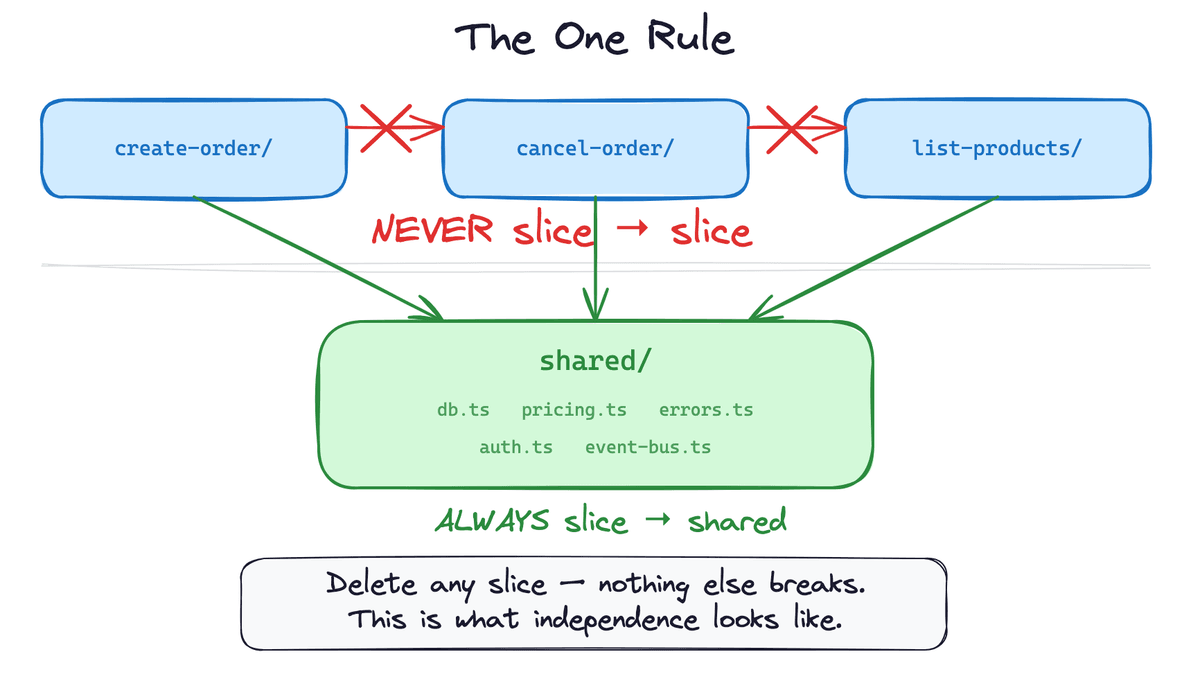
The rule: slices import from shared/. Slices never import from other slices. Enforce this with eslint-plugin-boundaries or Nx module boundaries. We covered the tooling in Screaming Architecture & Colocation. Structure without enforcement is just a suggestion.
This keeps each slice independent. If you delete “cancel order”, nothing else breaks. If you need to change pricing logic, it’s in one place — shared/pricing.ts — not scattered across multiple slices.
Keep shared/ small. The moment it grows into a mini-framework, you’ve recreated the layered architecture inside a different folder.
But when do you extract vs. duplicate?
Simple rule of thumb: if two slices need the same logic and that logic would need to change in sync (same business rule, same source of truth), extract it to shared/. If two slices happen to look similar but could diverge independently, let them duplicate. Premature extraction creates coupling. Duplication between independent slices is cheap.
Data Access
The DB client (db.ts) lives in shared/. But each slice owns its queries: create-order writes its own db.orders.create(), list-products writes its own db.products.findMany(). You can see exactly what data a use case touches by reading one file.
For transactions that span multiple tables, keep them in the slice that orchestrates the operation. The slice that creates an order and writes order items can wrap both in a single db.$transaction() call. If a transaction truly spans multiple use cases, that’s a sign you might need a new slice that represents the combined operation.
When Slices Need to Talk
What happens when creating an order that needs to trigger a notification?
Two options: domain events (create-order emits OrderCreated, other slices subscribe via a lightweight emitter in shared/) or a shared orchestrator (a workflow function in shared/ that calls use cases in sequence). Either way, slices don’t import each other’s internals. They communicate through shared/ infrastructure.
Tradeoffs
This architecture is not a silver bullet. As with everything in programming, it has pros and cons.
What you gain:
- Features are self-contained — easy to find, easy to understand, easy to delete
- Adding features = adding folders, not modifying existing files
- Tests live next to the code they test
- New team members can orient quickly (”find the feature folder, everything’s there”)
- Merge conflicts drop dramatically when teams work on separate features
What you trade:
- Some duplication between slices (mitigated by
shared/) - No single view of “all validation” or “all database queries” across the app
- Requires discipline to keep slices independent (the temptation to import from other slices is real)
- Unfamiliar to developers coming from traditional MVC backgrounds
The duplication tradeoff is the most common objection.
But here’s the thing: a little duplication betweenindependentslices is far easier to manage than tight coupling betweensharedlayers.
When you change shared validation logic, you need to verify that it doesn’t break 15 other features. When you change validation inside a single slice, the blast radius is exactly one feature.
When to Use (and When Not To)
Use vertical slices when:
- Your app has many distinct features or use cases
- Multiple developers or teams work on separate features
- You’re building an API with 15+ endpoints
- You want features that are easy to add and easy to remove
Keep the simpler structure when:
- Your app has fewer than 10 routes
- You’re building a library, not an application
- Heavy cross-cutting logic dominates (e.g., every request does the same 10 processing steps)
- You’re prototyping and the domain isn’t clear yet
📗 If slicing by use case clicks for you, my book The Conscious Node goes further — 157 production tips on module boundaries, repositories, testing, and shipping Node.js systems that hold up.
📌TL;DR
- Vertical Slice Architecture organizes code by use case, not by technical layer — one folder per operation, not per concern
- Each slice contains its handler, business logic, validation, types, and tests — everything in one place
- The split between handler (HTTP) and use case (business logic) keeps slices testable without framework dependencies
- Slices import from
shared/but never from each other — enforce this with linting rules - Keep
shared/small: extract only when two slices share logic that must change in sync. Otherwise, let them duplicate - Cross-cutting concerns (auth, errors) stay in middleware. Cross-cutting business logic goes in
shared/as explicit calls - Migrate incrementally: one use case at a time. Old layers shrink naturally until you delete them
- Best suited for apps with many distinct features, multiple teams, or 15+ endpoints. Skip it for small apps or early prototypes
Next Steps
Some of you may not like the idea of grouping all the files related to a feature in a single folder.
However, there’s a lot of value in grouping by features in general. And you don’t need to restructure everything at once.
We covered the broader migration strategy in Screaming Architecture & Colocation. The VSA version is very similar - pick one use case and extract, create the feature folder, inline the service layer, move the tests, do the routing, and repeat.
Start with something isolated. Once the pattern clicks, the rest goes faster.