In a 2015 post on zero-downtime Postgres migrations, Chris Sinjakli of GoCardless, a payments company, describes a migration that looked routine. It renamed a few new, still-empty tables, then dropped and re-created their foreign keys to fix the constraint names.
"Just after the schema migration started, we started getting alerts about API requests timing out," he writes. The timeouts lasted about 15 seconds, until the migration went through.
Nothing in the migration was slow, and the tables had no rows. A long-running read on the parent table happened to be open when it started, and that was enough.
So a migration's lock queue can stall any busy table, whatever its size. This post explains it, then covers five schema changes that turn dangerous once a table is big. The examples use Postgres and an expenses table from a payments app. MySQL has the same queue (its lock_wait_timeout defaults to a year), but the fixes differ.
The lock is short. The queue behind it is the outage.
Most of the risky ALTER TABLE statements take ACCESS EXCLUSIVE, the strongest lock Postgres has. It blocks everything, plain SELECTs included. Many ALTERs hold it for about a millisecond, so the lock alone isn't the problem.
The problem is the queue. If an open transaction has touched the table (a slow report, or a transaction someone forgot to close), your ALTER can't get its lock yet. It waits at the front of the line.
Any query that arrives after it, even a trivial SELECT ... WHERE id = $1, waits behind the ALTER, because it conflicts with the lock the ALTER is about to take.
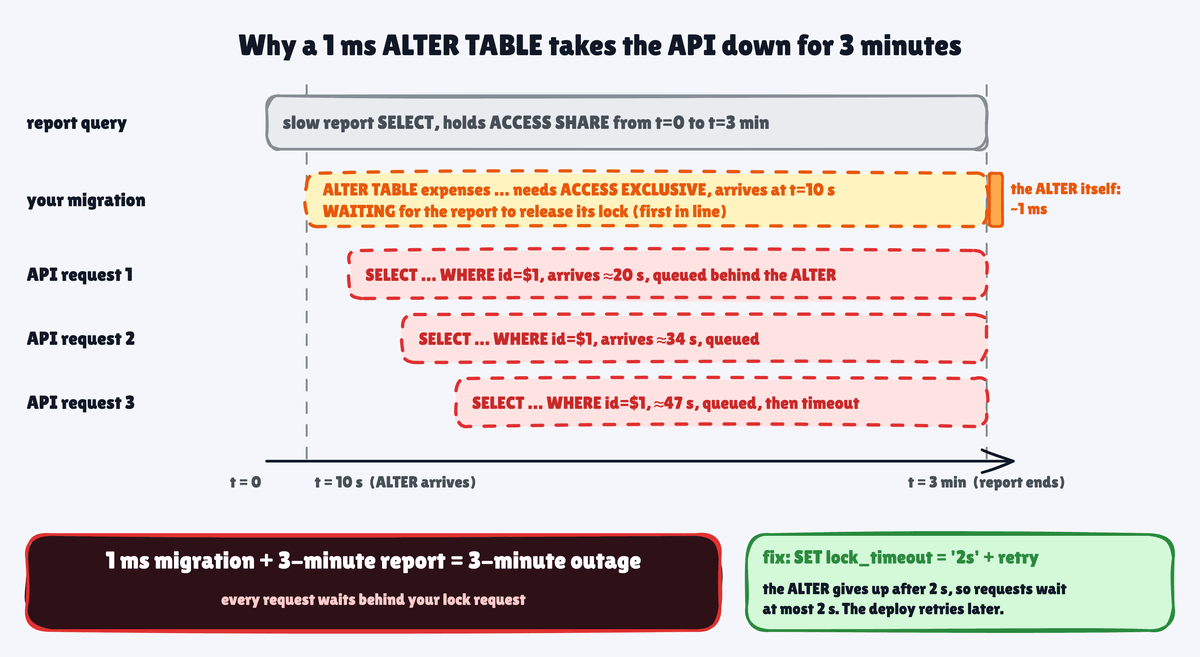
In a test on Postgres 17 and 18, an 8-second report held a read lock on expenses. An ALTER TABLE expenses ADD COLUMN arrived a second later and waited. A primary-key lookup that arrived after the ALTER waited 6.5 seconds for one row.
Two settings cap the damage:
SET lock_timeout = '2s';        -- give up on the lock fast, retry later
SET statement_timeout = '30s';  -- stop a statement that runs longer than planned
With lock_timeout, the ALTER failed after 2 seconds with canceling statement due to lock timeout, and the lookup went through after 1.5. The timeout doesn't remove the stall. It caps it, so pick a number your app can tolerate.
Then retry a few times with a short pause. Knex, node-pg-migrate, and Drizzle don't retry, so put the loop in your deploy script. Each attempt can still stall requests for up to 2 seconds.
GoCardless puts it plainly: "It's better to abort a deploy than take your application down."
The rest of this post assumes both are set, with one exception. VALIDATE CONSTRAINT and CREATE INDEX CONCURRENTLY run for minutes, and their lock lets reads and writes through. Set both timeouts to 0 for them, or a timeout cancels them halfway.
NOT NULL on a big table: add a check first, then the constraint
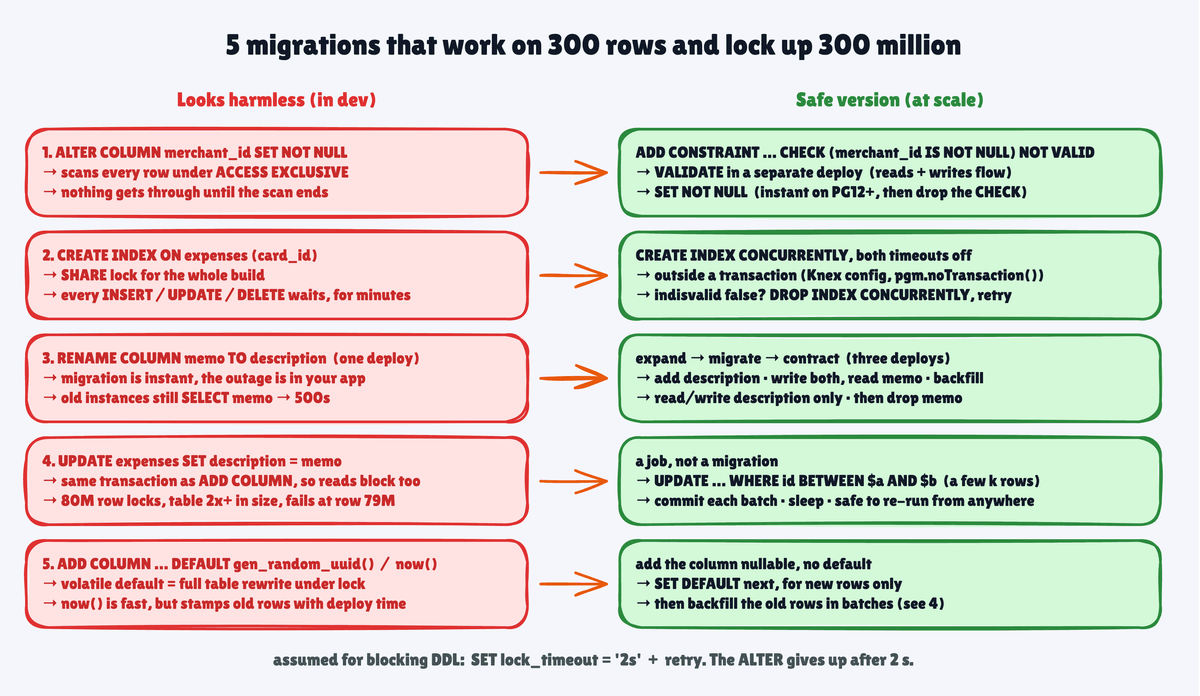
ALTER TABLE expenses ALTER COLUMN merchant_id SET NOT NULL has to prove that every existing row passes. That takes a full table scan under ACCESS EXCLUSIVE. With 300 million rows, that scan reads tens of gigabytes. Reading that from a cloud disk can take minutes, and nothing gets through until it ends.
The safe version takes three migrations:
-- Migration 1: instant, checks new rows only
ALTER TABLE expenses ADD CONSTRAINT expenses_merchant_id_check
  CHECK (merchant_id IS NOT NULL) NOT VALID;

-- Migration 2: scans the table while reads and writes continue
ALTER TABLE expenses VALIDATE CONSTRAINT expenses_merchant_id_check;

-- Migration 3: instant on PG12+, because the CHECK proves it
ALTER TABLE expenses ALTER COLUMN merchant_id SET NOT NULL;
ALTER TABLE expenses DROP CONSTRAINT expenses_merchant_id_check;
VALIDATE still reads the whole table, but its lock (SHARE UPDATE EXCLUSIVE) lets reads and writes through. Ship the three steps in separate deploys. Knex's migrate:latest and Drizzle run all pending migrations in one transaction, and there the first step's ACCESS EXCLUSIVE lock stays held through the whole scan.
Postgres 18 can skip the CHECK, with ADD CONSTRAINT expenses_merchant_id_not_null NOT NULL merchant_id NOT VALID and a later VALIDATE.
Foreign keys get the same split, NOT VALID first and VALIDATE in a later deploy. That skips the scan, but a foreign key change still locks both tables. Adding one blocks writes on both. Dropping one takes ACCESS EXCLUSIVE on both, so one slow read on the parent stalls every query on either table. That's what happened when GoCardless's migration dropped its foreign keys.
An index build blocks writes unless you say CONCURRENTLY
CREATE INDEX takes a SHARE lock for the whole build. Reads keep working, but every INSERT, UPDATE, and DELETE on expenses waits until the index is done. A big table takes minutes to index, and every card payment in that window waits or times out.
CREATE INDEX CONCURRENTLY builds the index without blocking writes. It has three catches:
- It can't run inside a transaction. Most migration runners wrap migrations in one, so opt that migration out. In Knex, export
config = { transaction: false }from the file. In node-pg-migrate, callpgm.noTransaction(). Drizzle has no opt-out (issue #860, open since 2023), so run that statement outside its migrator. - It's slower, and it waits. It scans the table twice, then waits until every older transaction in the database finishes, whatever table it touched. Under a 2-second
lock_timeout, one slow report cancels it. - A failed or canceled build can leave an
INVALIDindex. No query uses it, and writes may still update it. Checkpg_index.indisvalidafter each concurrent build. If it's false, runDROP INDEX CONCURRENTLYand build it again, or useREINDEX INDEX CONCURRENTLY. A re-run withIF NOT EXISTSsilently keeps the broken one.
Renames and drops break the app version that's still running
The migration itself is instant, so the outage comes from your app. During a rolling deploy, old and new instances run side by side for a few minutes.
Rename expenses.memo to expenses.description, and every old instance that still selects memo fails with column "memo" does not exist. A drop does the same, even in code that never names the column. postgres.js prepares statements by default, and a prepared SELECT * fails with cached plan must not change result type.
The safe version is expand, migrate, contract, across three deploys:
- Add
description. Deploy code that writes both columns and still readsmemo. - Backfill
descriptionfrommemo. Deploy code that reads and writes onlydescription. - Drop
memo.
It's slow, and it's the only version that survives a rolling deploy.
A backfill belongs in a job, not in the migration
The quick way is to run UPDATE expenses SET description = memo in the same migration as the ADD COLUMN. It runs as one long transaction over 80 million rows.
It locks every row it updates until it commits. The ADD COLUMN lock (ACCESS EXCLUSIVE) stays held until the commit too, so nobody can even read the table. In a test on 5 million rows, a primary-key lookup waited 9.7 seconds behind it.
The update writes a new version of every row, so the table more than doubles in size. If it fails at row 79 million, Postgres rolls back the whole thing and leaves 79 million dead rows for vacuum to clean up.
The safe version is a separate job. Update in batches by primary key range, commit each batch, and pause between batches. The description IS NULL check makes it safe to re-run:
DO $$
DECLARE last_id bigint := 0;
BEGIN
  WHILE last_id < (SELECT max(id) FROM expenses) LOOP
    UPDATE expenses SET description = memo
     WHERE id > last_id AND id <= last_id + 5000 AND description IS NULL;
    last_id := last_id + 5000;
    COMMIT;                 -- each batch releases its row locks
    PERFORM pg_sleep(0.1);  -- give replicas and vacuum room
  END LOOP;
END $$;
Run it outside any transaction, from psql or a job runner. Against a million-row test table, concurrent lookups and inserts stayed under 20 ms the whole time.
A default that isn't a constant rewrites the table, or lies
Since Postgres 11, ADD COLUMN status text NOT NULL DEFAULT 'pending' is instant. The default lives in the catalog and fills in when an old row is read.
Two cases still bite. A volatile default (DEFAULT gen_random_uuid(), DEFAULT random()) needs a different value for every row, so Postgres rewrites the whole table under ACCESS EXCLUSIVE.
DEFAULT now() is fast, because now() isn't volatile. The ALTER evaluates it once, so every existing row gets the start time of the migration's transaction. If the column is submitted_at, your finance reports now say 80 million expenses were submitted at 2:04 PM on a Tuesday.
For anything that isn't a constant, add the column with no default. Set the default in a second statement, which is instant and applies only to new rows. Then backfill the old rows in batches, from real data such as an audit log.
Five questions catch these before review ends
Before a migration touches a table you'd call big, ask:
- Is
lock_timeoutset, and does the deploy retry when it fires? - Does this statement scan or rewrite the table, as a type change from
inttobigintdoes? If yes, is there aNOT VALIDorCONCURRENTLYversion? - Will the previous version of the app still work while the deploy rolls out?
- Is every data change batched, re-runnable, and outside the schema migration?
- Can I undo this without a second outage?
For the last one, ship a tested rollback in the same PR (a down function in Knex and node-pg-migrate). It can't bring back a dropped column's data, so the drop always comes last.
For a tool that asks these for you, squawk lints raw SQL migrations for most of these patterns (not backfills), and pgroll runs expand and contract for you.
📌 TL;DR
- The queue is the outage. A waiting
ALTERblocks every query behind it. GoCardless's API went down for about 15 seconds this way, from one long read and a migration on empty tables. Setlock_timeoutso the ALTER gives up, and retry. SET NOT NULLand new foreign keys scan under a strong lock. Add the constraintNOT VALID, thenVALIDATEit in a separate deploy.CREATE INDEXblocks writes. UseCONCURRENTLYoutside a transaction, with both timeouts off, and check forINVALIDleftovers.- Renames and drops break the old app version during a rolling deploy. Expand, migrate, contract.
- Backfills are jobs, not migrations. Batch by primary key, commit often, and make the job re-runnable.
- Constant defaults are instant since Postgres 11. Volatile defaults rewrite the table, and
DEFAULT now()stamps every old row with the deploy time.