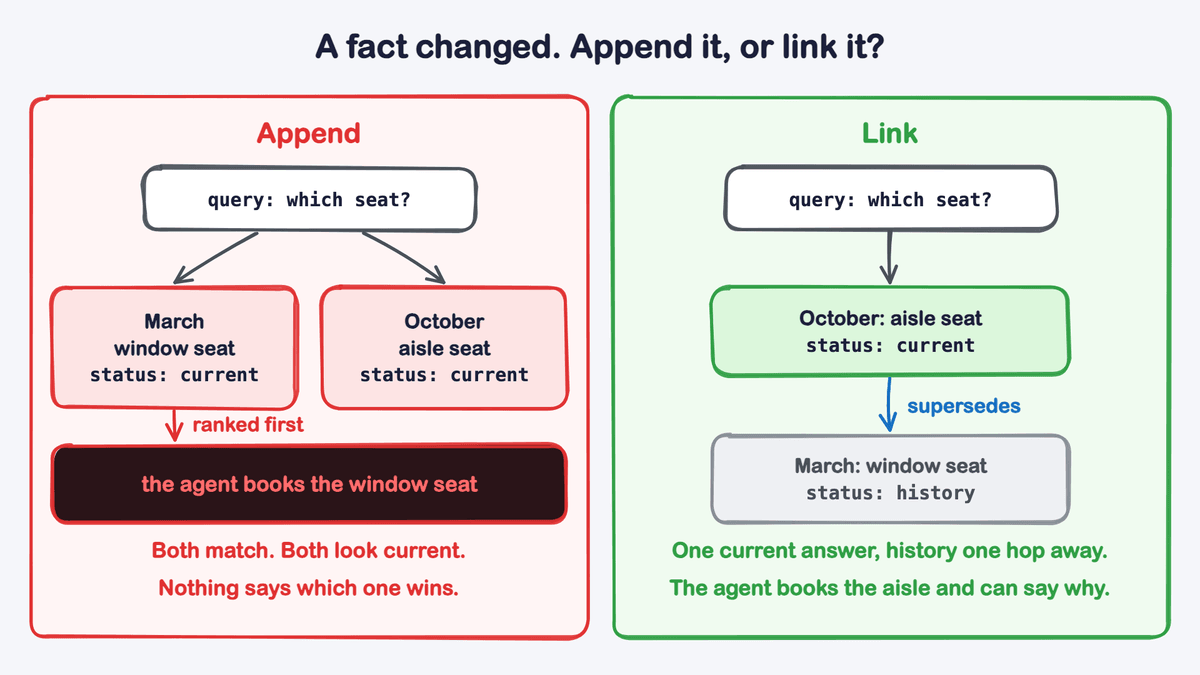
In March, a traveler tells a trip agent she wants a window seat on long flights. In October, she says she wants an aisle seat from now on. A week later, the agent books her a window seat.
Nothing crashed. Both memories match "seat preference", both look current, and nothing tells the agent which one wins.
Agent memory is data with a lifecycle, and backend engineers solved most of this years ago for ordinary data. Here are seven decisions that carry those habits over to agents.
1. Store facts, not transcripts
A memory is a durable fact, such as "prefers aisle seats on long flights". The 40-message chat where she said it is a log.
Keep the two apart. Search transcripts at recall time and you get chatter, plus the same fact in five phrasings competing for one slot in the prompt.
Go deeper: Generative Agents: Interactive Simulacra of Human Behavior (UIST 2023), where a reflection step "synthesizes memories into higher-level inferences over time".
2. Scope every search before you rank
Filter by tenant and user before similarity search runs, and by trip only for facts that belong to one trip. Ranking decides what's relevant, not what a caller may see, so it won't keep another traveler's passport details out of the prompt.
A search that names no user should fail with an error instead of searching everyone's memories. A job that really needs to search across users should say so in the code, where a reviewer sees it.
Check that your vector index applies the filter during the search. Many approximate indexes filter after they scan, so a per-user query can come back empty. An index on tenant and user, or a partition per tenant, fixes it.
Go deeper: OWASP, LLM08:2025 Vector and Embedding Weaknesses. Jeremy Daly, Hybrid Retrieval for Agent Memory on the Oracle Developers blog.
3. Search two ways, then rerank
Some questions are about meaning. "Which seat does she like?" has to find "would rather sit by the aisle", although the two share almost no words. Vector search is good at that.
Other questions are about exact strings, like the booking reference K7Q2XM. Keyword search is good at those.
Run both inside the scope from decision 2, then take two more steps.
- Merge the two lists. Reciprocal rank fusion (RRF) is the usual method. It looks only at positions, so a memory near the top of both lists ends up near the top of the merged one.
- Rerank the top few results. A reranker is a slower second model that scores each candidate against the question.
Measure each step on your own data. Merging alone can score lower than a single good search.
Go deeper: Cormack, Clarke and Büttcher, Reciprocal Rank Fusion outperforms Condorcet and individual Rank Learning Methods (SIGIR 2009). The Hybrid Retrieval for Agent Memory post scores each step on a small example.
4. When a fact changes, link it instead of overwriting it
This is the decision that fixes the window seat.
Overwrite the old fact, and the agent loses the history it needs to explain itself ("you switched to aisle in October"). Append the new fact, and both look current. That's how the window seat got booked.
Data warehouses settled this long ago. They don't overwrite a customer's address when history matters. They close the old row, open a new one, and flag the current version. Kimball calls it a type 2 slowly changing dimension.
Do the same with memory. Keep both facts, link the new one to the old one with a typed link such as "supersedes", and mark the old one as no longer current. A search for the seat preference then has one current answer, the October one, with the March one attached as history.
Do the swap in one transaction, and let the database enforce the rule. Give each fact a slot key, such as the user plus "seat preference", with a unique index on it for current rows only. Read the current fact and decide whether it changed before the transaction opens, so a slow model call doesn't keep the transaction open. Then, inside the transaction, mark that exact fact as no longer current first, and insert the new one with its link after it. If the old fact was no longer current, or the insert hits the unique index, another writer got there first. Roll back, read again and decide again.
The application makes the link when it knows the event, such as a rebooking. When the change comes out of conversation, like the seat preference, the step that extracts memories has to notice it. Store each fact with its message id and that message's place in the conversation. A fact from an earlier message can't replace the current one. When the slot already has a fact from this message, skip the write, so a job that runs twice changes nothing.
Go deeper: Ralph Kimball, Slowly Changing Dimensions, Part 2 (2008), and Martin Fowler, Event Sourcing (2005). For typed links between memory records, see Oracle's post What's New in Oracle AI Agent Memory.
5. Expand one hop, and set the defaults yourself
Following links brings back the history behind a fact, and it can also flood the prompt. Start with one hop and a small cap on linked results. The trip agent then gets the October preference on top with the March one under it, so it books the aisle and can still say why.
Then check what your library returns for a superseded record when you set nothing. When old records still reach the prompt and the prompt builder ignores their status, the link from decision 4 fixes nothing. Write your defaults down where a reviewer can see them.
6. Budget the prompt, not the result count
Ten results of 500 tokens make a different prompt from ten of 20 tokens.
A bigger context window doesn't fix this. Lost in the Middle found that models often do best when the relevant text sits at the start or end of the input, and that performance "significantly degrades" when it sits in the middle. More memories can push the one that matters into the middle.
So cap tokens instead of rows, and pick the kind of cap on purpose. A hard budget never goes over, even if that means returning nothing. A soft budget is a target. Use a hard cap when the prompt has a fixed slot, and a soft one when an empty answer is worse than a long one.
Go deeper: Lost in the Middle: How Language Models Use Long Contexts (TACL 2024). Casius Lee, What is context engineering? on the Oracle Developers blog.
7. Test the update path, not just recall
Most memory tests ask "does it remember?" The production bug is "does it notice the change?"
State a fact in session one and change it in session three. In session five, ask a question that only the new fact answers, and fail the test if the old one shows up as current. Run it whenever extraction, linking or retrieval settings change.
LongMemEval treats "knowledge updates" as one of five long-term memory abilities it tests. Across the whole benchmark, it reports a 30% accuracy drop for commercial chat assistants and long-context models over sustained interactions.
Go deeper: LongMemEval: Benchmarking Chat Assistants on Long-Term Interactive Memory (ICLR 2025).
Start with the link
If you only change one thing this week, make it decision 4. Find the place where your agent writes a memory, and ask what happens when the same fact arrives with a new value. If the answer is "we append it", you have the window-seat bug.
This article is sponsored by Oracle Developers.
To go deeper on typed links and one-hop retrieval, Oracle's developer team has a walkthrough with a runnable Python notebook: What's New in Oracle AI Agent Memory 26.8.
📌 TL;DR
- Store facts, not transcripts. Keep the chat in a log.
- Scope before you rank. Filter by tenant and user first.
- Search two ways, then rerank. Measure each step on your data.
- Link changed facts instead of overwriting them. Swap them in one transaction, and let a unique index on current rows keep one fact current.
- Expand one hop, and set the defaults yourself. Check what comes back for superseded records.
- Budget tokens, not rows. Choose hard or soft caps on purpose.
- Test the update path. State a fact, change it, and check the agent uses the new one.